Search that shows its working.
Ask anything. Inkling reads the web, lists its sources before it writes a word, and numbers them as it goes, so you can check what it says against the page it came from. When a question doesn’t need the web, it says so.
Have an account? Open Inkling
Free account, no card, unlimited Quick answers.
A Quick answer to “Are leap seconds going away?”. Four sources, from bipm.org, nature.com, hpiers.obspm.fr and blog.cloudflare.com, are listed before the answer is written; its three paragraphs carry numbered citations; and the stamp reads Quick answer, Frontier tier, 3.1s, 4 sources read.
In this edition
Inkling doesn’t ask you to trust it. It shows you how to check. Nine short chapters on how it answers, what it shows you, and what you can do with an answer once you have one.
- Recreated in code
- Built with Inkling’s own type, colours and labels, with example content.
- Screen from the app
- A capture of Inkling itself.
01. The answer: The sources arrive before the first word.
Inkling gathers its sources first, then writes. By the time a sentence appears, the pages behind it are already listed beside it, numbered, with the publisher’s name first.
Each cited claim carries a small numbered mark. Hover it to see the page (publisher first, then date and title), (note 1) and click to open it. Citation numbers are checked against the sources Inkling actually read: a number that matches none of them never becomes a link, and it is removed from the saved answer. Inkling is instructed to answer from those sources, in the language you asked in, and to say plainly when they don’t cover the question.
Above every answer sits a stamp: the depth you asked for, the tier that served it, how long it took and how many sources it read. (note 2) It names a tier, never a model. If an answer was served at a lower depth than you asked for, the stamp says that too.
Also printed when it happens:“Served at a lower depth than requested.”
Also printed when it happens:“Served at a lower depth than requested.”
- stampA tier, never a modelTime. Measured, not promised.
- citation chipHover to preview, click to open
- sources railListed before the answer starts
- domainWho said it, first
- caveatInkling can be wrong…
A Pro answer with five parts labelled: the stamp, which names a tier and never a model; a citation chip, which previews and opens its page; the Sources rail, listed before the answer starts; each source’s domain, set first; and the caveat, “Inkling can be wrong.” A switch shows the same question served lower, at Quick, with the line “Pro is paused right now, so this was answered at Quick.” Beside it, a diagram shows a citation that matches no source staying plain text.
A tier is a promise; a model name is an implementation detail wearing a promise’s clothes.
02. Depth: One switch decides how hard it works.
Quick, Pro and Research are depths, not plans. Choose one in the ask box, and change it for any follow-up.
Quick gives a cited answer in a few seconds. Pro search plans up to three angles of search and reasons over up to ten sources before it writes. Research drafts a plan you can watch (up to six sections, searched a few at a time and ticked off as they finish), then turns up to twenty sources into a structured report with its own Contents.
Every free account gets all three: Quick with no meter, five Pro searches a day and one research report a month. (note 1) You’re charged when you ask, never halfway through an answer, and if an allowance runs out Inkling offers to answer at Quick instead. (note 2) Already have a Quick answer? Press Run as Research under Go deeper and it becomes a report.
Try it — press a depth
Are leap seconds going away?
Yes, though not overnight. In November 2022 the General Conference on Weights and Measures voted to stop adding leap seconds to UTC in or before 2035.12
Planning the search
- 1The 2022 CGPM decision
- 2How leap seconds are announced
- 3What leap seconds broke in software
- 1What a leap second is and why it exists
- 2How leap seconds are announced
- 3The 2022 decision and what changes by 2035
- 4What leap seconds broke in software
- 5How systems step or smear a leap second
- 6What happens to UTC without leap seconds
What a leap second is and why it exists
Leap seconds exist because the Earth doesn’t turn as steadily as atomic clocks tick. Between 1972 and 2016, 27 were added to keep UTC within 0.9 seconds of the Earth’s rotation; the last was inserted on 31 December 2016.3
Contents
- 1. What a leap second is and why it exists
- 2. How leap seconds are announced
- 3. The 2022 decision and what changes by 2035
- 4. What leap seconds broke in software
- 5. How systems step or smear a leap second
- 6. What happens to UTC without leap seconds
- Reads up to
- 5 sources
- Plans
- —
- Writes
- a cited answer
- On Free
- Unlimited
- On Pro
- Unlimited
- Reads up to
- 10 sources
- Plans
- up to 3 search angles
- Writes
- a reasoned, cited answer
- On Free
- 5 a day
- On Pro
- Unlimited
- Reads up to
- 20 sources
- Plans
- up to 6 report sections
- Writes
- a structured report with Contents
- On Free
- 1 a month
- On Pro
- 50 a month
Figures in Pro and Research answers need the Pro plan — see 06
The depth switch beside a table of the three depths. Quick reads up to 5 sources and writes a cited answer; Pro plans up to 3 search angles and reads up to 10; Research plans up to 6 report sections, reads up to 20 and writes a structured report with Contents. On Free, Quick is unlimited, Pro 5 a day and Research 1 a month; on Pro, Pro is unlimited and Research 50 a month. The specimen below shows the same leap-second question answered at each depth.
03. Nothing searched: When the web isn’t needed, it says so.
Not every question needs a search. A toast, a rewrite, a well-known idea: Inkling can answer those directly, and it stamps them in plain words: “nothing searched”.
A direct answer never leaves an empty sources column for you to read as “searched and found nothing”. One click on Search anyway runs it as a real search, and Shorter or Funnier rewrites it. Inkling is built to lean towards searching: when it isn’t sure, or when a question touches health, law or money, it’s designed to search.
…a needless search is cheap, a missing one is a wrong answer.
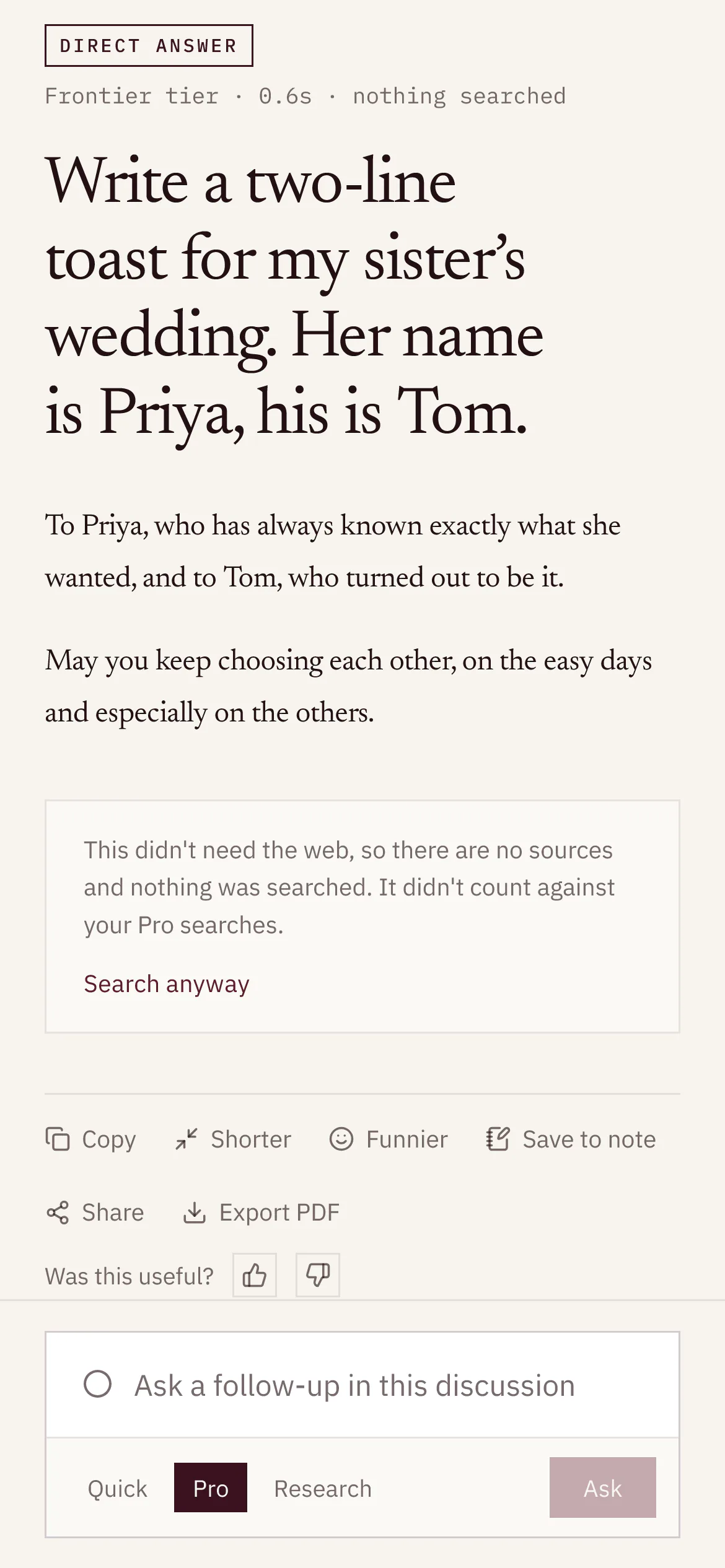
You’re charged when you ask. If you asked at Pro or Research depth and the answer needed no search, that search goes back into your allowance, and the count says so.
The usage line reads “You have used 2 of 5 Pro searches today.” A question asked at Pro takes it to 3 of 5; the answer turns out to be direct, and the count returns to 2 of 5.
And when something isn’t working, it says that too.
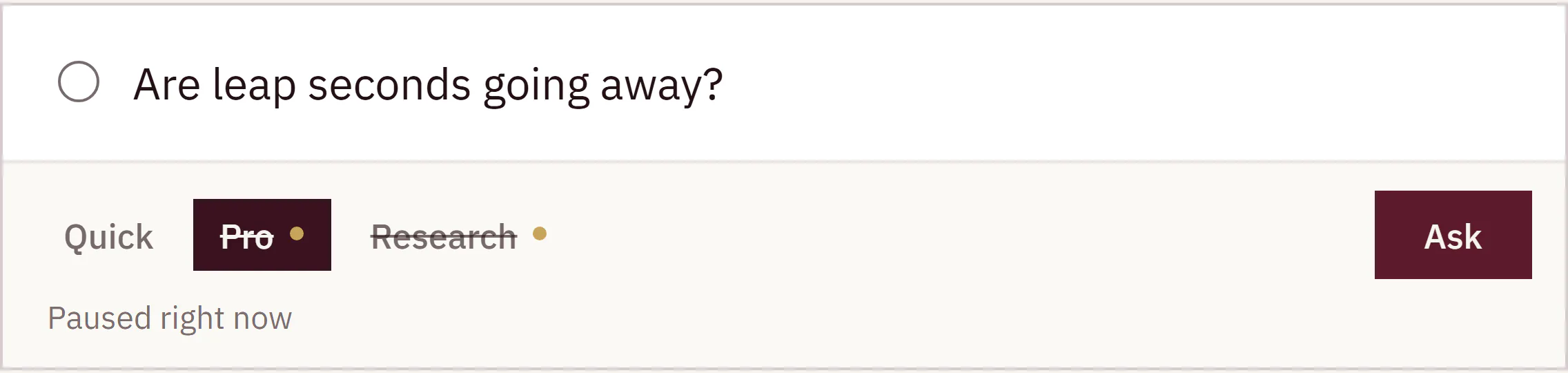
If Pro or Research is paused, your question is still answered, at Quick, before anything is charged, and the answer tells you so. Every status is posted by a person; the health check can draft one but never posts it. When there is nothing to report, the status page says exactly that:
No problems have been posted.
04. The discussion: A thread, not a query.
Every question opens a discussion. Ask the next thing in your own words; Inkling works out what “it” and “that one” refer to.
Follow-ups are rewritten into full searches behind the scenes, so the sources match what you meant, not just your last few words. Under the newest answer, Keep going suggests where to look next. (note 1) Discussions are titled for you and kept in a library you can search, filter by depth, pin, rename, archive or delete.
Answers are written on Inkling’s side, not in your tab. Close the tab or lose signal, and the answer keeps being written and picks up where you left off. Stop keeps whatever has arrived. Under an answer: Copy, Regenerate, Save to note, Share and Export PDF, with figures included, on every plan. (note 2)
A discussion in three turns: “Are leap seconds going away?” with a Quick answer, “Why is the Earth’s rotation irregular?” with a Pro answer, and the follow-up “And how do computers handle it?”, still being searched, with Stop in the follow-up box. Beside it, the library searched for “leap” narrows to two discussions.
05. Second opinion: A second opinion, paragraph by paragraph.
On the Pro plan, press Get a second opinion and a separate model researches your question again from scratch. It never sees the first answer.
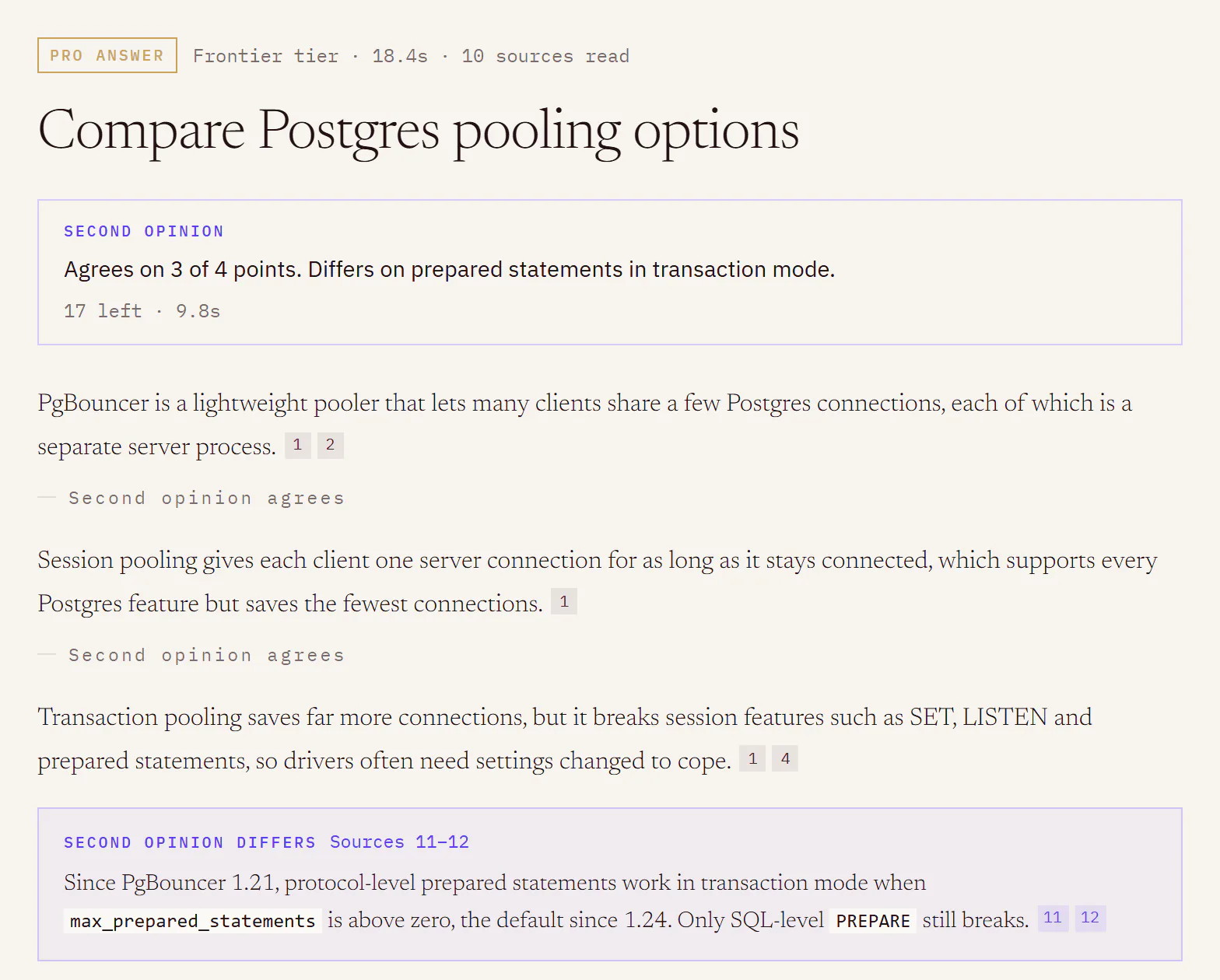
When it finishes, Inkling compares the two readings itself and sums it up in a line: the count, such as Agrees on 3 of 4 points, then where the two differ. Paragraphs it agrees with get a quiet mark. Where it differs, an inset opens beneath the paragraph with its own citations, and any new sources it read join the rail, numbered on. Hide it, and the answer is exactly as it was.
The count comes from Inkling’s own comparison, not from either model’s word for it.
- On the Pro plan, 20 a month, reset on the 1st (UTC).
- One per answer, on searched answers.
- Nothing is spent if it can’t be written.
Pro is in early access. Request Pro access
Compare Postgres pooling options
Second opinion
Searching
Second opinion
Agrees on 3 of 4 points. Differs on prepared statements in transaction mode.
17 left · 9.8s
PgBouncer is a lightweight pooler that lets many clients share a few Postgres connections, each of which is a separate server process.12
Session pooling gives each client one server connection for as long as it stays connected, which supports every Postgres feature but saves the fewest connections.1
Transaction pooling saves far more connections, but it breaks session features such as SET, LISTEN and prepared statements, so drivers often need settings changed to cope.14
Since PgBouncer 1.21, protocol-level prepared statements work in transaction mode when max_prepared_statements is above zero, the default since 1.24. Only SQL-level PREPARE still breaks.1112
Newer poolers such as PgCat add read load balancing and failover on top of pooling, with sharding still experimental.3
Sources
10 readPgBouncer features
How Connections Are Established
postgresml/pgcat: PostgreSQL pooler with sharding, load balancing and failover support.
Compatibility Notes
+6 more
Second opinion read
2 new of 9PgBouncer changelog
Prepared Statements in Transaction Mode for PgBouncer
Also read sources 1, 2, 3, 4, 5, 6 and 7 above.
A Pro answer comparing Postgres pooling options, and its second opinion. The verdict reads “Agrees on 3 of 4 points. Differs on prepared statements in transaction mode.” A quiet “Second opinion agrees” sits under paragraphs one, two and four; under paragraph three, an inset where the second opinion differs on prepared statements in transaction mode, citing two new sources, 11 and 12, which join the rail.
06. Figures: Drawn from the sources, and yours to edit.
When a topic has structure worth seeing, a Pro or Research answer on the Pro plan (note 1) can draw it: up to two numbered figures, (note 2) built from the same sources the prose cites.
Flowcharts, sequence diagrams and timelines are drawn as text, so they stay editable. Open one beside its code, fix a label by hand, or describe the change in a sentence and let Inkling redraw it. (note 3) Every chart names the sources its numbers came from (Chart from sources 4, 7), (note 4) and if a chart cites a source the answer didn’t read, it isn’t drawn.
Open the data behind any chart as a table. Download figures as SVG or PNG and charts as CSV, or export the whole discussion to PDF with the figures printed in it. Diagrams are drawn as plain SVG and never run scripts.
Pro is in early access. Request Pro access
Are leap seconds going away?
What a leap second is and why it exists
As shows, the IERS compares UT1, the time kept by the Earth’s rotation, with UTC, and announces a leap second in Bulletin C when the gap is predicted to approach 0.9 seconds.14
Total
| Category | Total |
|---|---|
| 1970s | 9 |
| 1980s | 6 |
| 1990s | 7 |
| 2000s | 2 |
| 2010s | 3 |
Contents
- 1. What a leap second is and why it exists
- 2. How leap seconds are announced
- 3. The 2022 decision and what changes by 2035
- 4. What leap seconds broke in software
- 5. How systems step or smear a leap second
- 6. What happens to UTC without leap seconds
Figures
valid
flowchart LR A["Earth’s rotation measured (UT1)"] --> B["UT1 compared with UTC"] B --> C["Gap nears 0.9 s"] C --> D["IERS announces it in Bulletin C"] D --> E["UTC shows 23:59:60"]
flowchart LR A["Earth’s rotation measured (UT1)"] --> B["UT1 compared with UTC"] B --> C["Gap nears 0.9 s"] C --> D["IERS announces it in Bulletin C"] D --> N["About six months’ notice"] --> E["UTC shows 23:59:60"]
chart data{ "kind": "bar", "sources": [19], … }Cites source 19. This answer read 14. Not drawn.
A Research answer with two figures. Fig. 1 is a five-step flowchart of how a leap second is decided, from measuring the Earth’s rotation to UTC showing 23:59:60. Fig. 2 is a bar chart of leap seconds added by decade, 9, 6, 7, 2 and 3, from source 3. Beside them, a chart that cites a source the answer didn’t read is shown as data and not drawn.

07. Translate: Translation that shows you what to check.
Paste text in any of 44 languages. Inkling translates it and underlines the numbers, amounts, dates, durations and names it carried across, so you know where to look.
There is nothing to set up but the language pair. Inkling detects the source language, sets right-to-left scripts properly, and keeps the pair in the link, so /translate?from=sq&to=en-GB opens ready to go.
Qiramarrësi detyrohet të paguajë qiranë mujore në shumën 450 € deri më datën 5 të çdo muaji. Kontrata hyn në fuqi më 3 prill 2026. Depozita prej 900 € kthehet brenda 30 ditëve nga përfundimi i kontratës.
5 things to check — numbers, dates and durations are carried over, never rewritten.
Qiramarrësi detyrohet të paguajë qiranë mujore në shumën 450 € deri më datën 5 të çdo muaji. Kontrata hyn në fuqi më 3 prill 2026. Depozita prej 900 € kthehet brenda 30 ditëve nga përfundimi i kontratës.
5 things to check — numbers, dates and durations are carried over, never rewritten.
An Albanian lease clause translated into English (UK). In the translation, the rent amount, the day it is due, the date the agreement starts, the deposit amount and the thirty days for its return are each underlined, with a note: 5 things to check — numbers, dates and durations are carried over, never rewritten.
Whole documents, back as the same file.
Pro · early accessOn the Pro plan, hand Inkling a Word file, a deck or a spreadsheet and get the same file back in another language, with its tables, footnotes, page numbers, slide layouts and formulas where they were. A Kept as they are list counts what it left alone in your file. Review the translation beside the original with a Check these list that points to the exact paragraph, slide or cell. A PDF comes back as an editable Word file: the text, not the layout.
- Text, on every account: 2,000 characters at a time and 100 a day on Free; 20,000 and no daily cap on Pro.
- Documents, on Pro: 200 pages a month. PDFs up to 50 MB; Word, PowerPoint and Excel up to 25 MB; 300 pages a file. No scanned PDFs. Files are deleted 24 hours after the translation starts.
- This is a machine translation. For anything with legal effect, have a certified translator review it.
Page 3 of 14 of an Albanian lease in Word, translated into English in place: the heading, paragraph, table and footnote change language while the table rules, the footnote mark and the page-number field stay where they were. Beside it, the progress, the Kept as they are list, and where a check points in Word, PowerPoint and Excel.

08. Notes & todos: Keep what you learn, with its sources attached.
Save an answer, or just the two sentences that matter, into a note, and its citations come with it.
Notes are a real editor, with headings, lists, quotes, checkboxes and #tags typed anywhere. They’re kept until you delete them, on every plan. Beside each note, Inkling can answer questions about it, (note 1) summarise it in three lines, keep writing from where you stopped, turn it into todos, or find sources for claims that have none. Its suggestions arrive as lines you accept or reject one at a time; it never changes your words by itself.
Every checkbox becomes a todo, grouped by when it’s due. Hand to Inkling researches a todo as one Pro search, saves the full cited answer, and writes a short sourced passage under the todo. (note 2) You tick it off; Inkling never does. Take any note with you as Markdown, citations included, or print it.
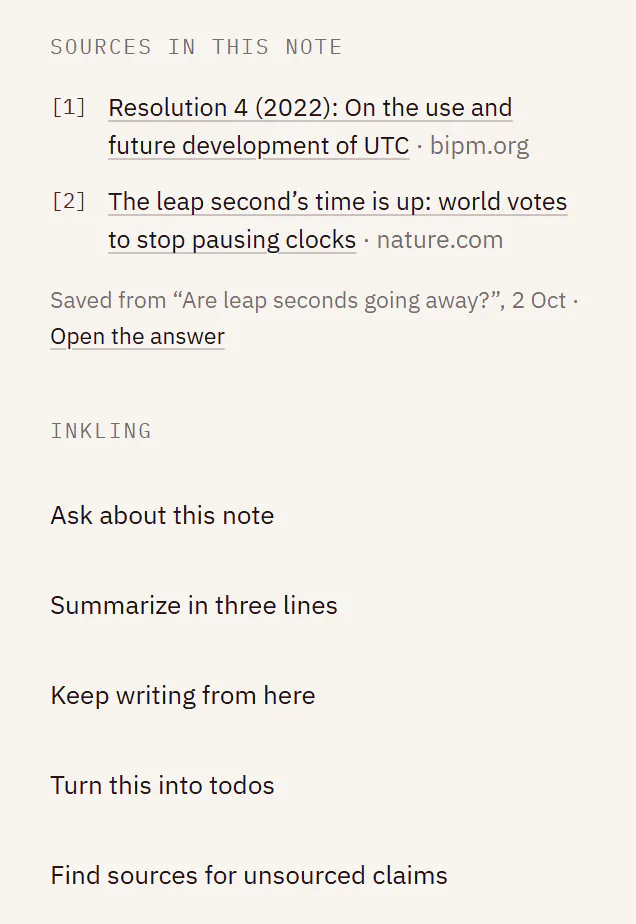
Three beats in a note called Leap second readiness. A paragraph of an answer is saved into the note with its two citations. Inkling suggests two lines; one is accepted and one rejected. A todo is handed to Inkling, which writes a sourced passage beneath it, and the checkbox stays unticked.
Inkling reads this note only when you use one of these, Ask Inkling or Cite on a selection, or hand it a todo.
09. Publish: Turn an answer into a page anyone can read.
Share one answer or a whole discussion as a clean public page, with every citation still clickable and no account needed to read it.
Choose what the page shows, whether search engines may list it, and whether readers can ask a follow-up; they sign in to keep the discussion, which continues in one of their own. Your name isn’t shown unless you publish under a handle. A page is a snapshot: later edits don’t change it until you publish again, and you can unpublish it from Settings › Shared pages at any time. Every page carries Report this page; a person reviews each report, and the reporter stays anonymous. Sharing is free on every plan.
- Free on every plan: 20 pages a day on Free, 200 on Pro. Publishing again doesn’t count.
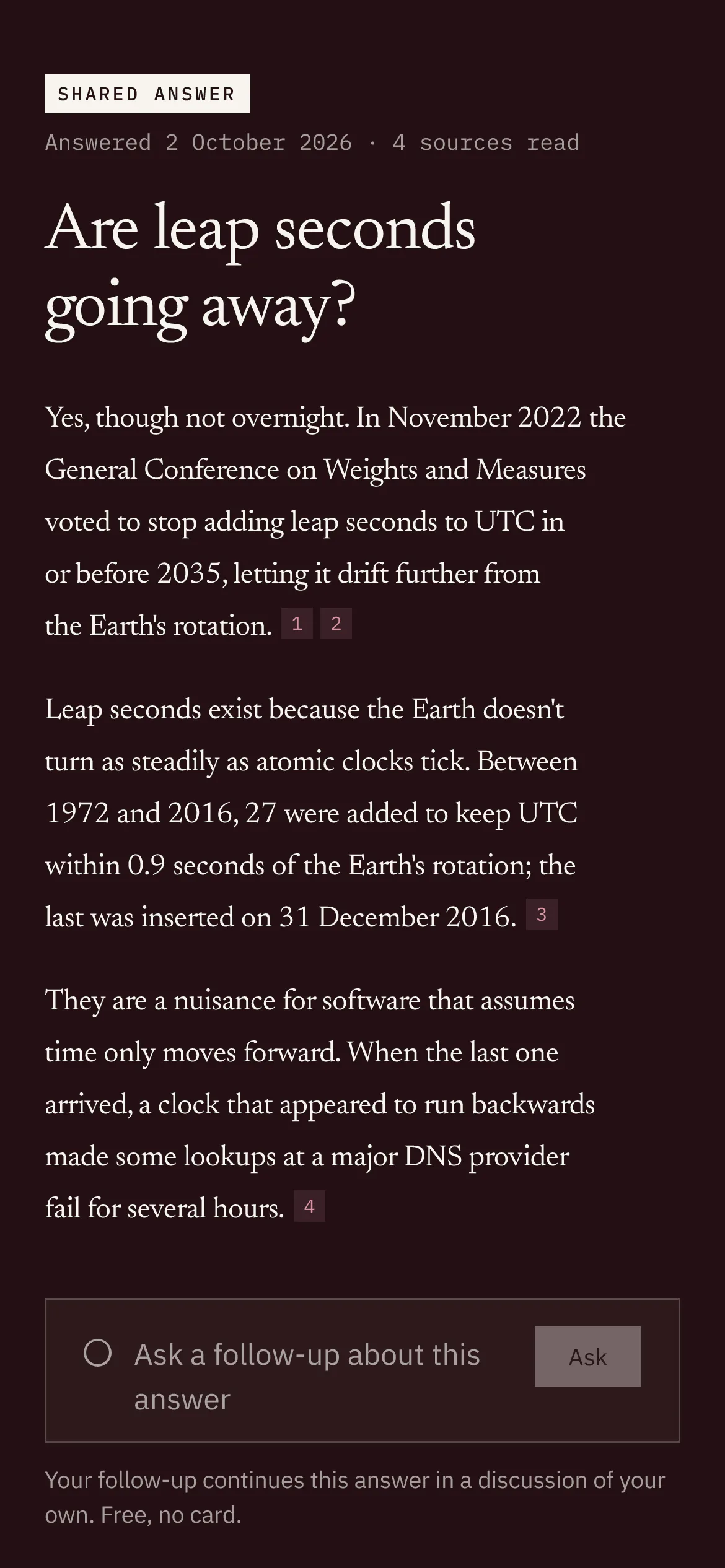
The share sheet for one answer, with Show sources and Let readers ask a follow-up switched on and Let search engines find it off. After Publish, the page’s link is copied, and the public page’s header reads Shared answer, Answered 2 October 2026, 4 sources read.

A body of work at one address.
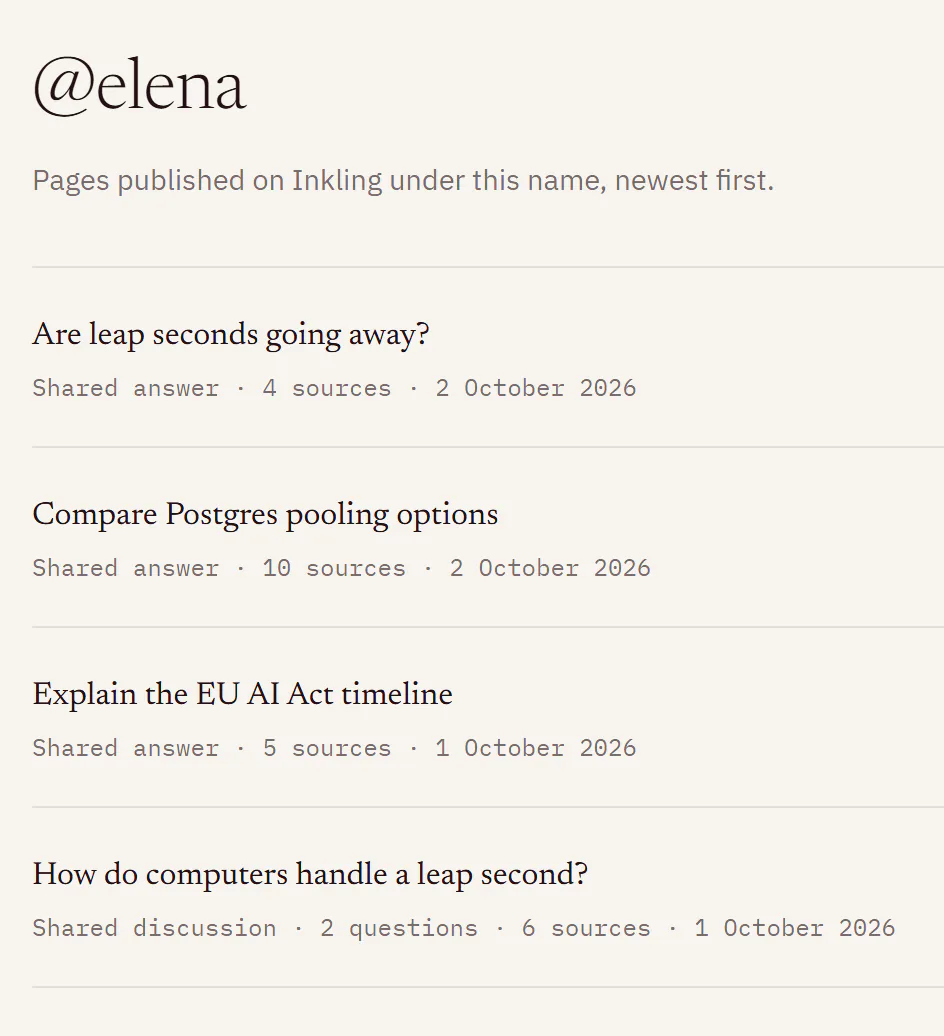
Pro · early accessOn the Pro plan, publish under your own @handle, and one profile lists every page you choose: a body of researched answers at a single address.
Your questions are yours.
What Inkling’s privacy notice and the app say about your questions.
Buildersoft does not sell your personal data or use your questions to train its own general-purpose model.
Privacy notice
No ad trackers: Inkling does not use advertising cookies, advertising identifiers or third-party behavioural advertising trackers.
Privacy notice
Inkling reads a note only when you press one of its actions. Asking about a note sends nothing to a search provider.
Notes
Product news is opt-in and never pre-ticked. It’s sent with no open or click tracking, and one link stops it, with no sign-in needed.
Email
The stamp names a tier, never a model, and says in words whenever an answer was served at less than you asked for.
The stamp
The platform’s own system prompt is visible in Settings, read-only. Yours can shape tone, length and language, never which sources are allowed.
Settings
Delete any discussion or note, unpublish any page, or delete your account, yourself.
Your data
Set for every screen.
On a phone, Inkling keeps its page: a tab bar for Ask, Translate, Notes, Discussions and Pro, sources stacked under the answer, and the follow-up box within reach of your thumb. Choose Porcelain, Full ink, or follow your system.
Press / or Ctrl K (⌘K on a Mac) to ask from anywhere, and move between depths with the arrow keys. Add Inkling to your browser as a search engine and ask from the address bar: inkling.buildersoft.io/search?q=… opens a cited answer once you’re signed in; signed out, your question is kept in that tab while you sign in.
Automated WCAG 2.1 A and AA checks run on every screen, in Porcelain and Full ink, on desktop and at 390 px on WebKit. Screen readers hear what Inkling is doing, not a stutter of fragments, and reduced motion is honoured. Inkling holds its first screen to a 130 KB script budget, enforced at every build.
Square keycaps for /, ⌘K, Enter, Esc and the arrow keys, lighting in turn, beside an address bar offering to search Inkling.
Free is not a trial.
Quick answers are unmetered on the free plan, with no card and no expiry. Pro is in early access, enabled by hand, one request at a time.
Free
No card, no expiry
Quick answers
Unlimited (see note)
Unmetered today and every day after it.
- 5 Pro searches a day
- 1 research report a month
- Text translation in 44 languages: 2,000 characters at a time, 100 a day
- Notes and todos, kept until you delete them
- Public pages for any answer or discussion, 20 a day
- Export any discussion as PDF
- 1 saved system prompt
Pro
Pro · early accessEarly access, enabled by hand. No subscription and no charge.
Everything in Free, and:
- Unlimited Pro search (see note)
- 50 research reports a month
- 20 second opinions a month
- Diagrams and charts in Pro and Research answers, 50 redraws a day
- Document translation, 200 pages a month: Word, PowerPoint and Excel in place; PDF comes back as Word
- Text translation up to 20,000 characters at a time, no daily cap
- Publish under your own @handle; 200 public pages a day
- Unlimited saved system prompts
A conversation, not a checkout. A person reviews each request and replies by email.
- Unlimited means unmetered. Fair-use rate limits apply on every plan.
- Daily allowances reset at 00:00 UTC; monthly allowances on the 1st.
- You’re charged when you ask, never halfway through an answer. A Pro or Research search comes back if the answer needed no search or couldn’t be served. When an allowance runs out, Inkling offers to answer at Quick instead.
- PDFs up to 50 MB; Word, PowerPoint and Excel up to 25 MB; 300 pages a file. Files are deleted 24 hours after the translation starts.
- These are current allowances and may change. Settings › Plan and usage always shows what’s left.
Further reading
The guide explains each part of Inkling in plain words. Six places to start:
- Ask your first questionThe box, the depth switch and the first answer/inkling/docs/ask-your-first-question
- Choose a depthQuick, Pro and Research, and what each one costs/inkling/docs/choose-a-depth
- Read an answerThe stamp, citations and the Sources rail/inkling/docs/read-an-answer
- Translate textDetect, things to check, language-pair links/inkling/docs/translate-text
- Notes basicsWrite, tag, export and delete notes/inkling/docs/notes-basics
- Allowances, resets and refundsResets, refunds, fair use and requesting Pro/inkling/docs/allowances-and-resets
Ask the question you came with.
A free account takes an email and a password. Type a question first and Inkling keeps it in that tab while you sign in or create an account.
Your question goes straight to Inkling; nothing is stored on this site.
Inkling can be wrong. Check the sources for anything that matters medically, legally or financially.
Set in Newsreader and IBM Plex, on porcelain.