Translate text
Checked against Inkling on , 4 min read
Open in InklingPaste text into Translate, let Inkling work out what language it is in, choose the language you want, and the translation streams in beside the original.
Before you start
- Translate is in the header, and in the tab bar on a phone. You can open Translate while signed out, but translating needs a free account. If you press Translate while signed out, Inkling says “Sign in to translate. Your text has been kept.” and keeps your text in that tab while you sign in.
- Text translation is on every plan. Free currently translates 2,000 characters at a time, 100 times a day. Pro translates 20,000 characters at a time, with no daily cap.
- The language pair is the only thing you set.
Translate some text
- Open Translate. The switch at the top left reads Text | Document; leave it on Text.
- Paste or type into the left pane (“Type or paste text to translate”). The counter above it shows how many characters you have.
- Leave the source picker on Detect, or choose the language yourself.
- Choose the target in the second picker. It starts on English · UK, and Inkling keeps your last choice on this device.
- Press Translate, or CtrlEnter (⌘Enter on a Mac). Enter on its own starts a new line.
On a phone, type into the box at the foot of the screen (“Type, paste, or attach a file”) and press the arrow beside it. In that box Enter translates and ShiftEnter starts a new line.
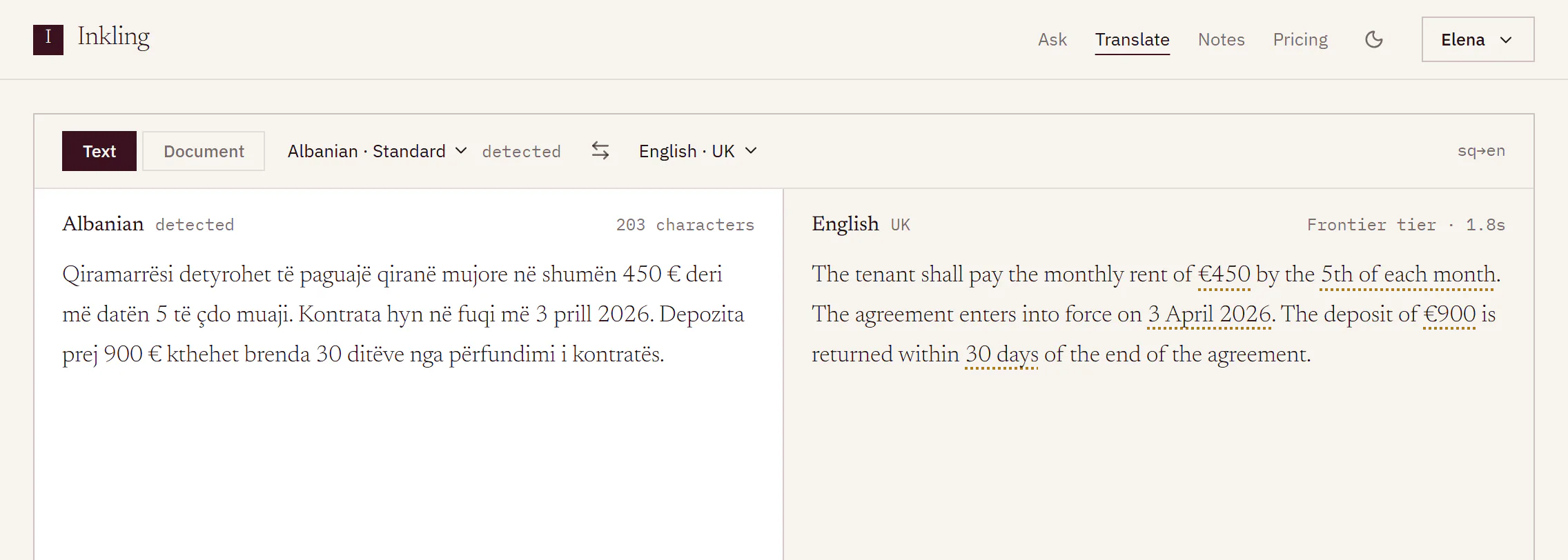
What you’ll see
- A status line reads “Detecting language”, then “Translating”, while the text streams into the right pane.
- The source picker shows the language Inkling found, tagged detected, or chosen if you picked it. If Inkling cannot tell, it reads Source; choose the language yourself to use Swap.
- When the translation is done, its header shows a tier and the time it took, such as “Frontier tier · 1.8s”. Inkling never names a model. If a lighter tier than usual served it, you see “Served at a lower tier than usual.”
- Numbers, amounts, dates, durations and names that were carried across get a dotted underline, and a note under the panes counts them. See Things to check.
- Under the translation: Copy, Save to discussions, Swap, and “Was this useful?”.
The controls
- Swap languages (the ⇄ button between the pickers), or Swap under a finished translation, turns the pair round and moves the translation into the left pane. Nothing is translated again until you press Translate.
- Clear empties the left pane and the result.
- Stop replaces Translate while a translation runs. What arrived is kept: “Stopped. What arrived before you stopped is kept above.” A stopped translation offers Copy only.
- Retry appears under a translation that could not finish, for example with “The translator could not be reached. Try again.”
Keep a translation
Inkling keeps a text translation for 24 hours. To keep it longer, press Save to discussions. The button reads “Saving…”, then Saved with an Open link to the new discussion, which you can find again in Discussions. Only a finished translation can be saved.
Share a language pair
The pair travels in the address, so a link opens Translate with both pickers set: Albanian into English. Leave out from to start on Detect. Short codes work too: to=en opens English · UK. Every code is listed in Supported languages.
Limits
| Free | Pro | |
|---|---|---|
| Characters in one translation | 2,000 | 20,000 |
| Text translations a day | 100 | No daily cap |
| Translations running at once | 1 | 1 |
| Kept without saving | 24 hours | 24 hours |
These are the current allowances. Daily allowances reset at 00:00 UTC; Plan and usage shows what is left. Past the limit, Free shows “That is N characters. Free translates 2,000 at a time — Pro translates 20,000.” with a Request Pro access link. Pro shows “Pro translates 20,000 characters at a time — split the text, or attach it as a document.”
Good to know
- Source and target must be different languages, not only different variants. If you choose both yourself, Inkling says “Source and target are both English — pick another language.” UK into US English, for example, is not a translation Inkling makes.
- If the text is already in the target language, the note under the panes reads “This already looks like [language] — pick another language.”
- When the day’s allowance is used: “You have used today’s translations; they refill at midnight UTC.”
- A translation that ends because the translator could not be reached is given back to your day. One you stop is not.
- If Translate is paused by a posted status, “Paused right now” appears beside Translate and your text stays where it is. See Service status.