Manage your shared pages
Checked against Inkling on , 3 min read
Open in InklingSettings › Shared pages lists every page you’ve published, shows whether search engines may list each one, and lets you take a page down.
Open Shared pages
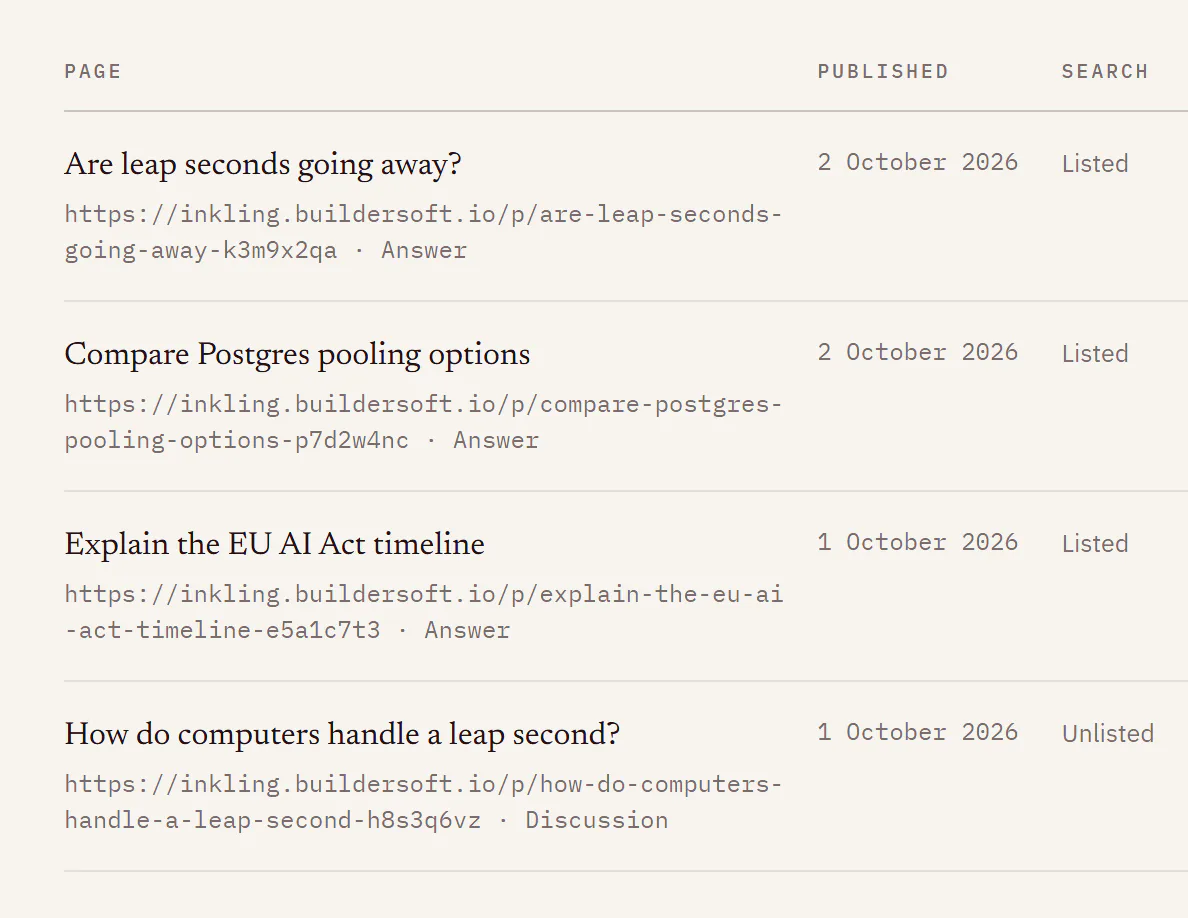
Open the account menu (your name, top right) and choose Shared pages, or go to Settings and choose Shared pages in the rail. It is also at Settings › Shared pages. The line under the heading counts your live pages, for example “4 published”.
What each row shows
Each row gives the page’s title, its address and whether it is an Answer or a Discussion, the date it was Published, and a Search column:
| Search says | What it means |
|---|---|
| “Listed” | Search engines may list the page. |
| “Unlisted” | You turned Let search engines find it off. Anyone with the link can still read it. |
| “Listing waits for a republish after [date]” | Your account is new, so the page is held out of search for now. Publish it again after that date to let search engines list it. |
| “Under review” | Something in the page was flagged for a person to look at. It stays out of search meanwhile, and its link keeps working. |
Take a page down
- Find the page and press Unpublish. There is no second step; the page comes down straight away.
- The row stays in the list, and Unpublish is replaced by “Removed by you”.
Anyone who opens the link from then on sees “This page was removed by its author.” Your discussion is not affected.
Change a page
Settings doesn’t edit pages. Open the discussion, press Share, change what you need, and press Publish again. As the panel says: “Pages are snapshots. If you keep asking in the discussion, the page does not change until you share it again.” See Share an answer or a discussion.
Pages that were removed
Removed pages stay on the list for 30 days, marked with what removed them:
| The row says | Why |
|---|---|
| “Removed by you” | You pressed Unpublish. |
| “Discussion deleted” | You deleted the discussion the page came from, which takes its pages down. |
| “Removed by staff”, with a reason | Buildersoft took the page down. |
When Buildersoft takes a page down, you get an email titled “A page you shared was removed”, which gives the reason and adds “The discussion itself is untouched.” Nothing from that discussion can be published again, not the same answer, another answer or the whole discussion. The share sheet says so, for example “This page was removed by staff: it was spam. It cannot be published again.”
Limits
| What | Limit |
|---|---|
| Removed rows kept in the list | 30 days |
| New accounts held out of search | currently the first 3 days after sign-up |
| New pages a day | currently 20 on Free, 200 on Pro |
Good to know
- The new-account hold doesn’t lift on its own. Once the date in the Search column has passed, open Share on that answer and press Publish again.
- Under review says no more than that. Inkling doesn’t tell you what was flagged. The hold lifts when a person keeps the page, or when you publish it again and nothing is flagged. If a person takes it down instead, you get the email above.
- On Pro, the same panel is where you choose a handle. See Your @handle profile.