Share an answer or a discussion
Checked against Inkling on , 3 min read
Open in InklingOn this page6 headings
Publish one answer, or a whole discussion, as a public page with its sources; sharing is on every plan, and anyone with the link can read the page.
Before you start
- Any signed-in account can share. Free currently includes 20 new pages a day and Pro 200, counted per UTC day. Publishing a page again never counts.
- The answer has to have finished. Saved translations can’t be shared.
Publish a page
- Under the answer, press Share.
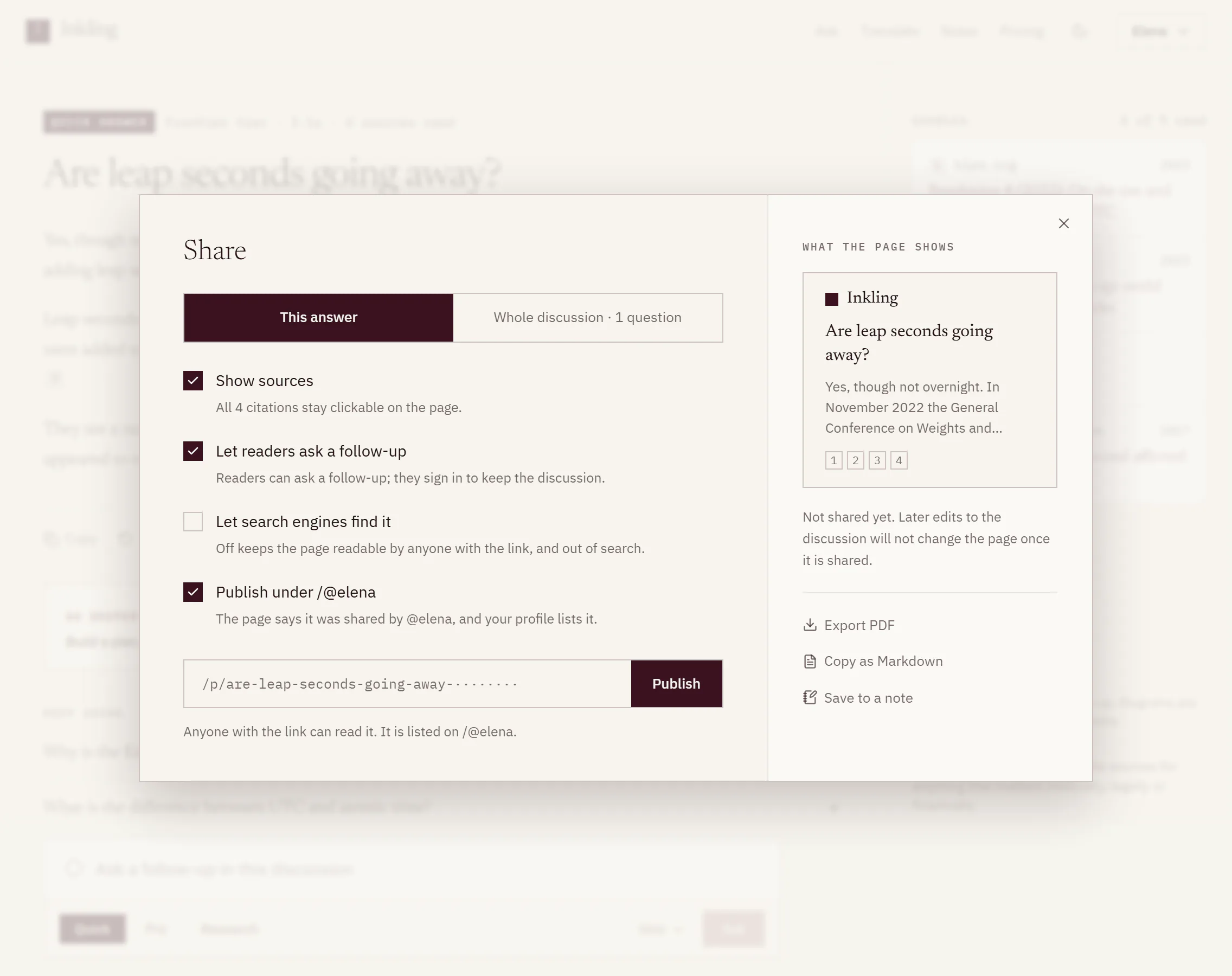
- Choose what to publish: This answer, or Whole discussion with its question count, such as “Whole discussion · 3 questions”.
- Set the switches:
- Show sources (on to start). The line under it says how many citations stay clickable, such as “All 6 citations stay clickable on the page.” Turned off, the page has no citations and no sources.
- Let readers ask a follow-up (on to start). “Readers can ask a follow-up; they sign in to keep the discussion.”
- Let search engines find it (on to start). “Off keeps the page readable by anyone with the link, and out of search.”
- On Pro, with a handle, Publish under your profile address (off to start). See Your @handle profile.
- Check What the page shows, the sheet’s preview of the page.
- Press Publish. The page’s address appears in the field and the button becomes Copy link. Press it to copy the address.
Update a page
A page is a snapshot of the moment you published it. Before you publish, the sheet says “Not shared yet. Later edits to the discussion will not change the page once it is shared.” Afterwards, it says when you shared it.
To bring the page up to date, open Share again and press Publish again. Change a switch first and the main button becomes Publish again too. The address stays the same, and it doesn’t count against your day. An answer has one page, and a discussion has one page for the whole of it.
Who the page says shared it
Unless you publish under a handle, the sheet tells you “Your name is not shown.”, and the page’s footer reads “Shared by an Inkling user.” Your display name never appears on a shared page.
Limits
| Free | Pro | |
|---|---|---|
| New pages a day | 20 | 200 |
| Publishing again | doesn’t count | doesn’t count |
| Publishes in any 10 minutes | 10 | 10 |
Over the daily limit, the sheet says “You have shared 20 pages today. You can share more tomorrow.” These are the current defaults.
Good to know
- Every publish is checked, including for personal details such as email addresses, phone numbers, and bank account or card numbers. If something is flagged, the page still goes up, marked “Under review”: it stays out of search while it waits for a person to look, and anyone with the link can still read it.
- New accounts start out of search. For the first days after sign-up, currently 3, pages stay out of search engines even with the switch on. The sheet gives a date: “Publish again after [date] to let search engines find it.” The hold lifts only when you publish again after that date.
- Some discussions share only single answers. One that started from a note says “This discussion started from a note; share single answers.” One that carries on from someone else’s shared page says “This discussion continues a shared page; share single answers.”, and the copied answers in it can’t be shared.
- Very long discussions may be refused as one page: “This is too long to share as one page. Share single answers instead.”
- What never goes on the page: the depth, the tier and the time an answer took, and any second opinion. Figures do appear.
- More from the sheet. It also offers Export PDF, Copy as Markdown and Save to a note.
- Every page you’ve published is listed in Settings › Shared pages, where you can unpublish it.