Review and download a translated document
Checked against Inkling on , 3 min read
Open in InklingDocument translation is part of Pro, which a person switches on after you ask, at no charge. On Free, Translate works on pasted text, and choosing Document shows “Documents are Pro” with Request Pro access. Request Pro access
Compare the translation with the original page by page, work through the Check these list, then download your file before it is deleted 24 hours after the translation starts.
Before you start
The result opens by itself when a document finishes translating, at an address of its own under /translate/d/. Keep that link if you want to come back to it: it works for 24 hours after the translation starts. To start a translation, see Translate a document.
Review the translation
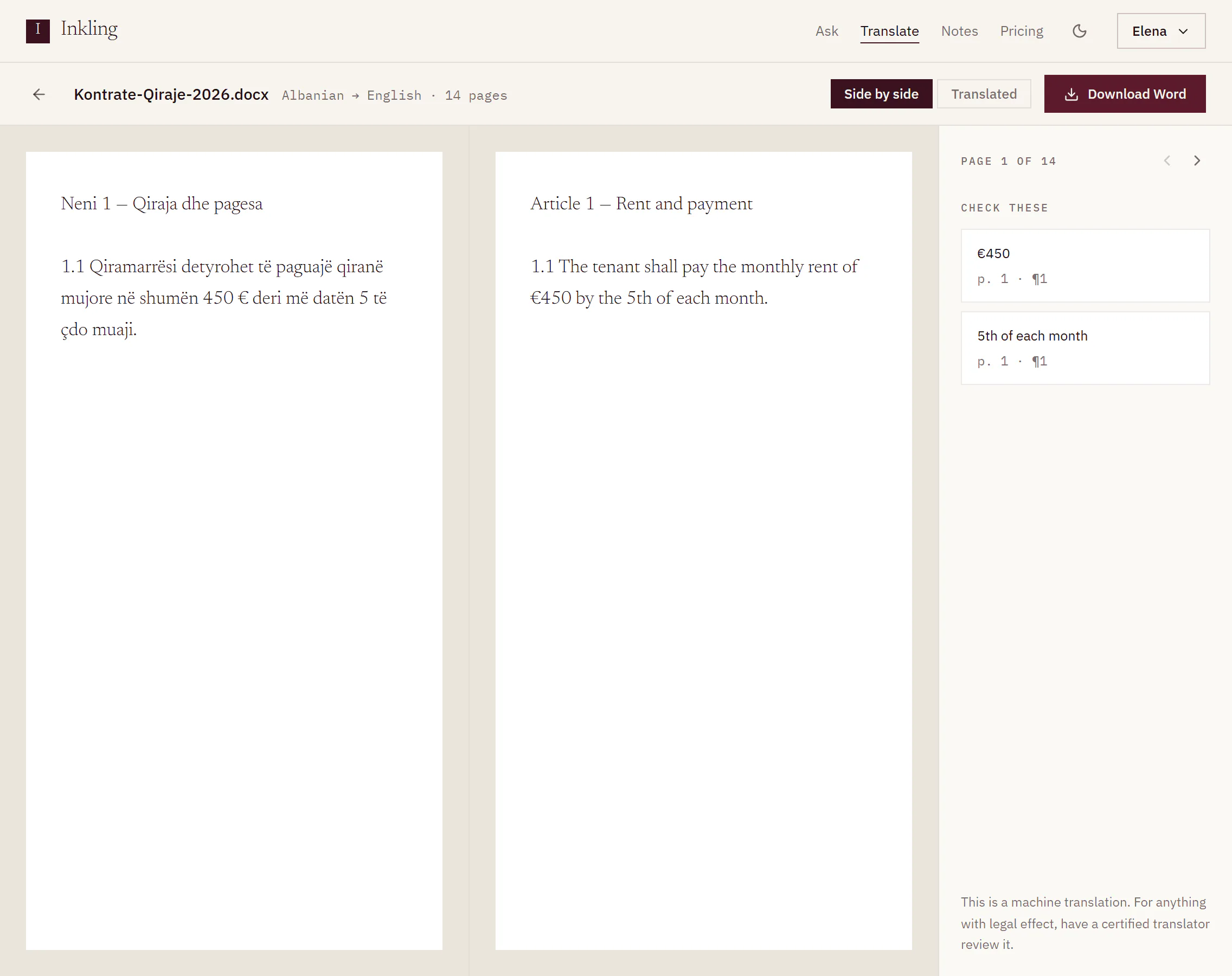
- Read the header. It shows the file name, then the pair and length, for example “Albanian → English · 14 pages”.
- Choose how to read it. Side by side puts the original and the translation next to each other, and the two scroll together. Translated shows the translation on its own.
- Use the rail on the right. It reads “Page 1 of 14”, and the arrows beside it (Previous page, Next page) turn the page.
- Work through Check these. It lists the numbers, amounts, dates, durations and names Inkling carried across on that page, each with the place it sits in your file. A page with none says “Nothing was flagged on this page.”
- Download the file with the button in the header.
Reading the locations
Each item in Check these names where to look in the downloaded file:
| File | Location looks like | Means |
|---|---|---|
| Word or PDF | p. 3 · ¶4 | page 3, paragraph 4 |
| Word | header · ¶1, footer · ¶1, footnote · ¶2 | a paragraph in the headers, footers or footnotes |
| PowerPoint | slide 3 · shape 2 | slide 3, shape 2 |
| Excel | Sheet1!B12 | the sheet named Sheet1, cell B12 |
What each kind of check means is explained in Things to check.
Download your file
- Word, PowerPoint and Excel files come back in their own format: Download Word, Download PowerPoint or Download Excel.
- A PDF original leads with Download Word, because the Word file is the one you can edit. A quieter PDF button sits beside it when Inkling could build a PDF in the target language’s script.
- The file is named after your original, with
inkling-in front and the target language code at the end. Kontrata.pdf translated into English · UK downloads asinkling-kontrata-en-gb.docx.
On a phone
On a narrow screen there is no side-by-side view. You get the translation, then the page arrows with Check these (n) folded up until you open it, and Show original at the foot to open the original text.
After 24 hours
The file and its translation are deleted 24 hours after the translation starts. The address then reads “This file was deleted 24 hours after translation. Upload it again to translate it once more.” with Translate something else.
A translation that did not finish shows “This translation did not finish. Upload the file again to try once more.” A stopped one shows “This translation was stopped before the file was built.”
Limits
| Pro | |
|---|---|
| Result and files kept | 24 hours after the translation starts |
| Downloads | 60 in any 5 minutes |
Good to know
- The pages here show the text of each page, set plainly so it is easy to compare. Open the downloaded file to see the layout.
- The rail carries the product’s own reminder: “This is a machine translation. For anything with legal effect, have a certified translator review it.”
- Uploading the same file again starts a new translation and uses pages from your month again.