Get a second opinion
Checked against Inkling on , 3 min read
Open in InklingSecond opinions are part of Pro, which a person switches on after you ask, at no charge. On Free, Get a second opinion carries a gold dot and opens “Second opinions are a Pro feature.” with Request Pro access and Not now; nothing is sent. Request Pro access
A separate model researches your question again without seeing the first answer, and Inkling marks, paragraph by paragraph, where the two agree and where they differ.
Before you start
- You need the Pro plan. Pro currently includes 20 second opinions a month, counted over the calendar month in UTC and back on the 1st. There are no top-ups.
- The answer must have finished and must have searched the web. Any depth works. A second opinion isn’t offered on a direct answer, a saved translation, or an answer copied from someone’s shared page.
Get a second opinion
- Under the answer, press Get a second opinion. Beside it you’ll see what is left, for example “18 of 20 left this month”.
- While it works, the button reads “Getting a second opinion…” with Stop, and a box under the question shows each stage: “Searching”, “Reading 9 sources”, “Writing”, then “Comparing the two answers”.
- Nothing is added to the answer until the comparison is done. Then the results arrive together.
How it stays independent
The second model does its own search and writes its own answer without ever seeing the first one. Only the final comparison reads both. Inkling counts the points of agreement itself; the number in the verdict is not a model’s claim. Inkling never names either model.
What you’ll see
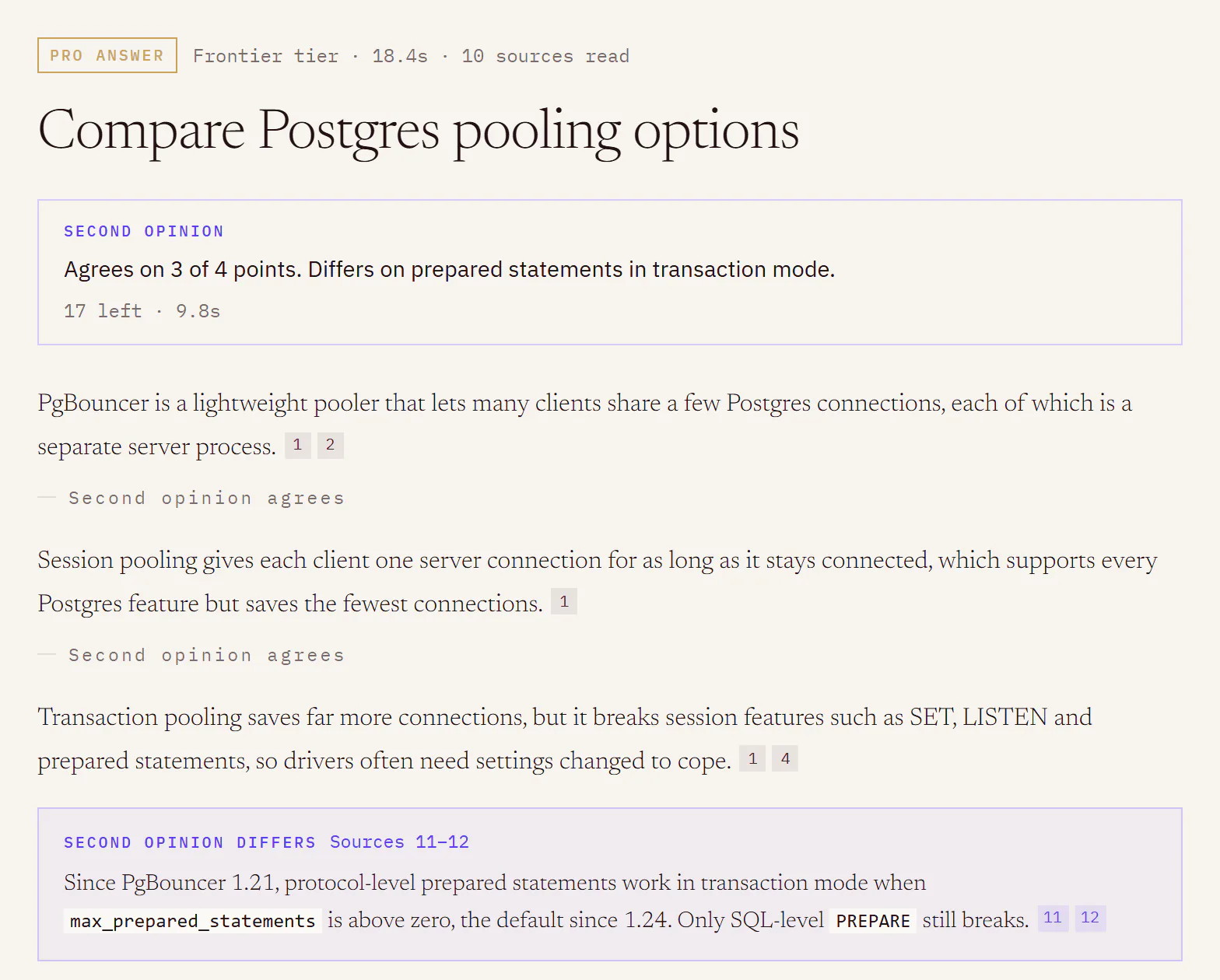
- The verdict, under the question and labelled Second opinion: “Agrees on every point.” or, for example, “Agrees on 3 of 4 points.”, followed by a sentence of summary.
- Agreement marks. A grey “Second opinion agrees” under each paragraph the second opinion agrees with.
- Differences. A violet inset headed “Second opinion differs” under a paragraph it disagrees with, saying how, with its own citations such as “Sources 11–12”.
- New sources. Second opinion read in the rail, with a count such as “1 new of 3”: the pages it read that the first answer had not, numbered on from the answer’s own. It also says when it read the same pages, for example “Also read sources 2 and 5 above.”
- Hide second opinion puts the answer back as it was, and Show second opinion brings the verdict and marks back. The second opinion stays with the answer when you come back to it.
Limits
| What | Limit |
|---|---|
| Second opinions | currently 20 a month on Pro; none on Free |
| On one answer | 1 |
| Running at once | 1 per account |
| Presses | 5 in any 10 minutes |
Plan and usage shows Second opinions with what is left and the date it resets.
When the button is greyed
| Beside the button | What it means |
|---|---|
| “0 of 20 left · resets 1 November” | This month’s are used. They come back on the date shown. |
| “Paused for today” | Second opinions are paused for everyone until midnight UTC. |
| “Paused right now” | A posted status has paused them. See Service status. |
Good to know
- If it fails, the line under the button says “The second opinion could not be written.” When nothing was served, it is given back and the line adds “Nothing was spent.” If you press Stop, the line says “Stopped before it finished.” and it still counts.
- It stays on the answer page. A second opinion never appears on a page you share, in Export PDF, in Copy or Copy as Markdown, or in Save to note, and follow-up questions don’t read it.
- If the answer changes later, for example when you save an edited diagram into it, the verdict stays with the line “The answer changed after this second opinion was written.”, and the marks and insets are taken off.