Research reports
Checked against Inkling on , 3 min read
Open in InklingResearch plans your question as a set of sections, searches each one, and writes a structured report you can find your way around.
Before you start
- Research is a depth, not a plan, so every account can use it. Free currently includes 1 research report a month, and Pro includes 50.
- A month is a calendar month in UTC. The allowance comes back on the 1st.
- Diagrams and charts inside a report need the Pro plan. On Free, a report is all text. See Diagrams and charts in answers.
Ask for a report
- On the home page, type your question, choose Research in the depth switch and press Enter.
- Or start from an answer you already have. Under a Quick or Pro answer, the Go deeper card reads “Build a plan, search every angle, and turn this answer into a structured report.” Press Run as Research. Inkling asks the same question again at Research depth, as a new turn in the same discussion.
- Watch the Research plan fill in. While it works, its summary line reads something like “3 of 6 searches complete · 9 sources”, and each step is ticked as its search finishes.
What you’ll see
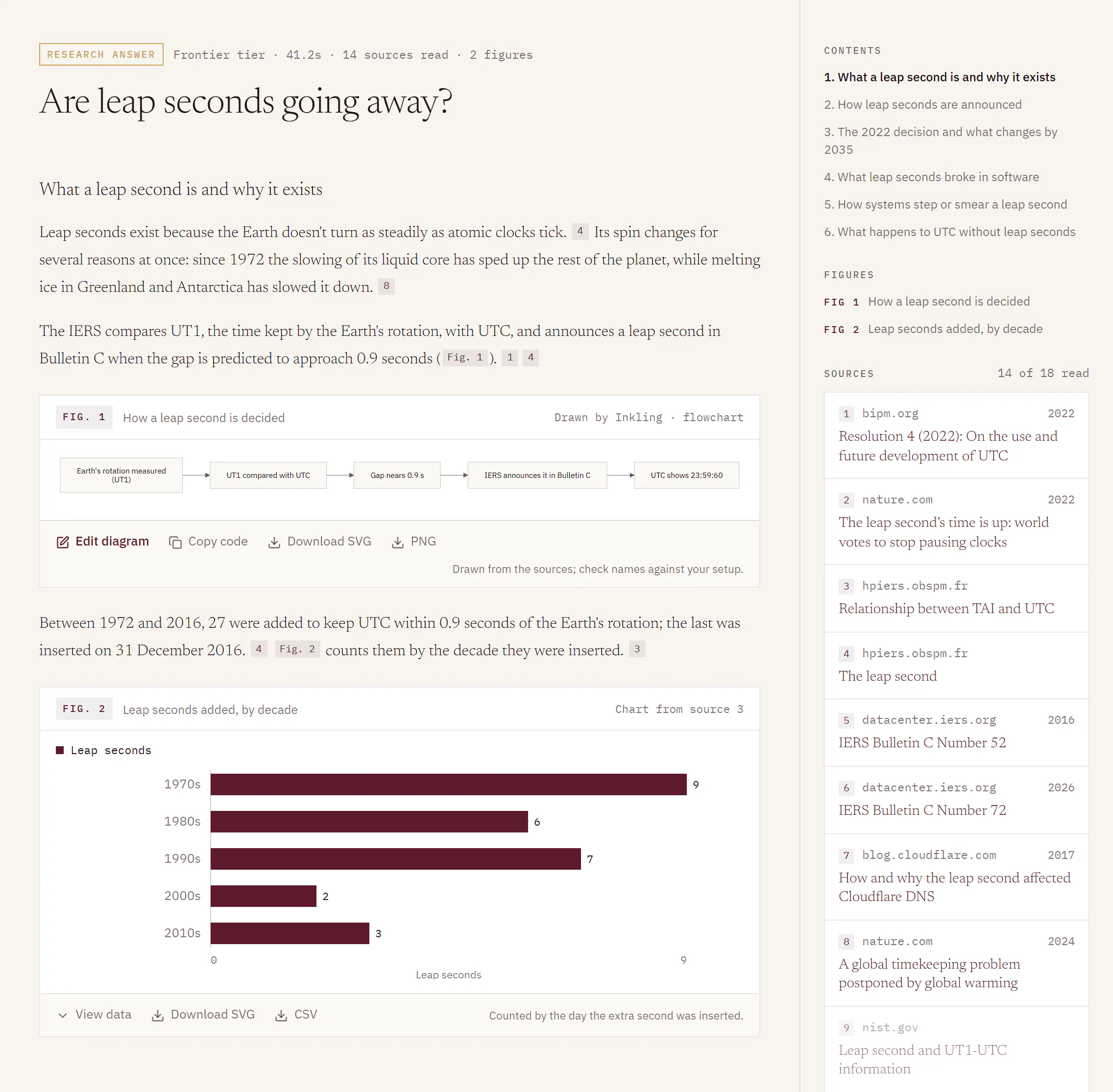
- The plan. On a wide screen it sits in the rail beside the report; on a phone it sits above it. When the report is done, the plan folds to a single line, such as “6 sections · 18 sources found”. Open it to see the steps again.
- The report. Inkling writes it to open with a short summary, use the plan’s headings as its sections, say where the evidence conflicts or runs out, and finish with a conclusion. Claims carry numbered citations, as in any answer.
- The stamp. The line above the report starts with Research answer, then the tier, the time taken, the sources read and, on Pro, the number of figures.
- Contents and Figures. Once a report has 2 or more sections, Contents in the rail lists them so you can jump between them. If the report drew figures, Figures lists each one as “FIG 1” with its caption. On a phone, both fold into one panel above the report, headed Contents, with a count such as “5 sections · 2 figures”.
Limits
| Free | Pro | |
|---|---|---|
| Research reports | 1 a month | 50 a month |
| Sections in a plan | up to 6 | up to 6 |
| Sources read | up to 20 | up to 20 |
| Figures in a report | none | up to 2 |
Allowances are the current defaults. Plan and usage shows how many reports you have left.
When this month’s report is used
If you ask for Research with nothing left, Inkling stops before anything is searched and offers three ways on: Request Pro access, Answer this with Quick instead, or Not now. Quick answers are unmetered on every plan, so nothing is counted if you take that route. The panel also says when your allowance resets.
Good to know
- When a report is given back. If Inkling decides the question doesn’t need the web, it writes a direct answer, stamped “nothing searched”, and the report is not counted. A report that could not be served at all is given back too. See Direct answers.
- Stopping part-way still counts. What arrived before you stopped stays on the page.
- Where Go deeper appears. Only under a finished answer that searched the web. It isn’t offered under a Research answer or a direct answer.
- Paused. If a posted status pauses Research, the Go deeper card stays in place but reads “Paused right now”. See Service status.