Answers that didn’t need a search
Checked against Inkling on , 3 min read
When a question needs no web search, Inkling answers it directly, says plainly that nothing was searched, and gives back the Pro search or research report you spent on it.
When Inkling answers directly
Before it searches, Inkling reads the question and decides whether a good answer depends on the web. It answers directly when you ask it to:
- write, rewrite, shorten, translate, summarise or reformat text you supplied, or an earlier answer
- brainstorm, plan or draft something, or explain a stable, well-known idea
- do arithmetic or reasoning on figures you gave it
- make small talk, or tell you about Inkling itself
It searches whenever a good answer depends on:
- anything that changes over time, such as news, prices, schedules, opening hours, recent versions or who holds a role now
- law, health, medicine, money, tax or safety, where an answer from memory can be out of date
- exact figures, statistics, dates, quotations or measurements you would want to check
- a specific product, company, place, person or website
- anything you would reasonably want to see a source for
When in doubt, Inkling searches.
What you’ll see
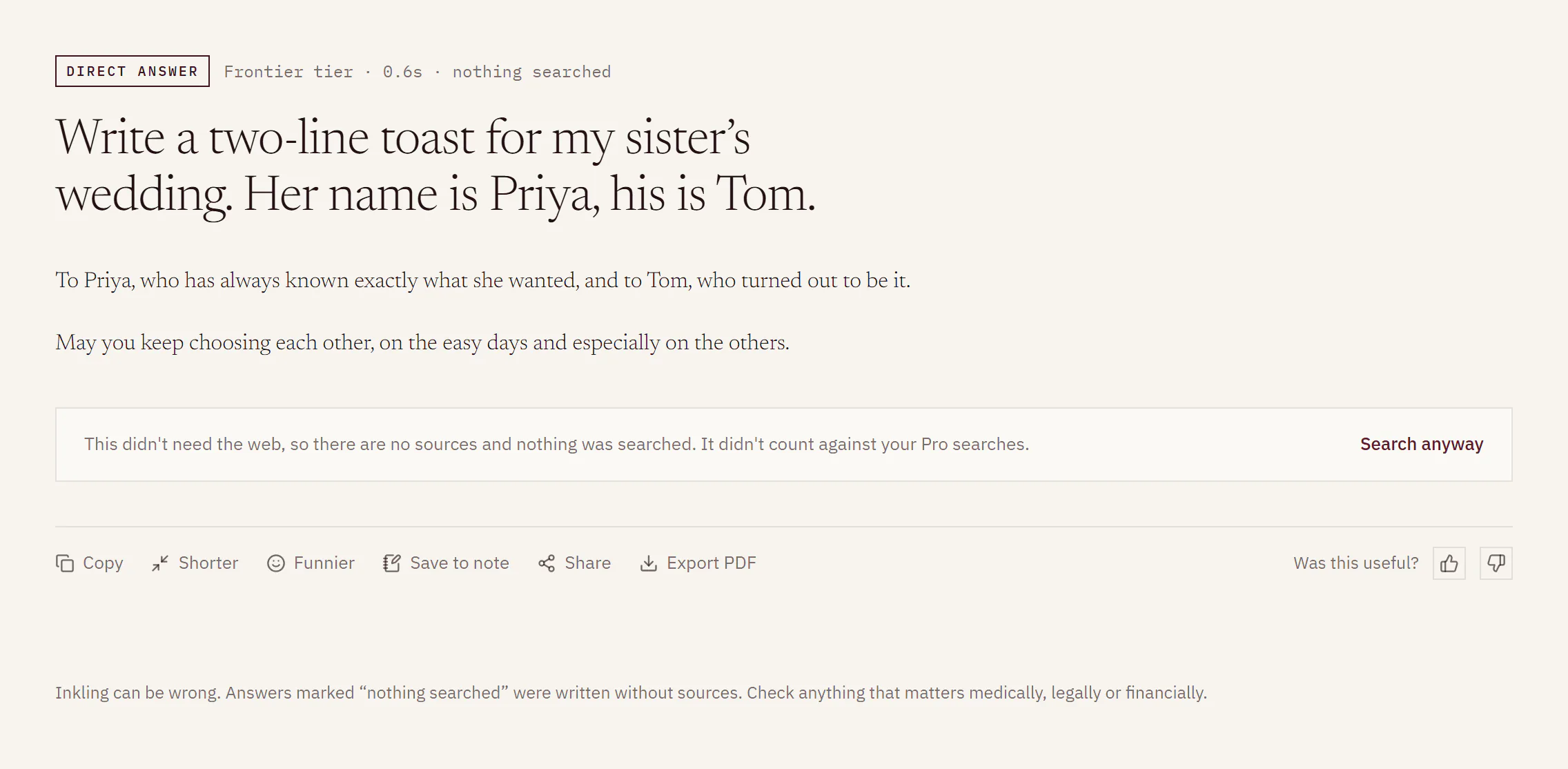
- The stamp’s chip reads “Direct answer”, and the facts after it end in “nothing searched”, for example “Frontier tier · 0.6s · nothing searched”.
- Under the answer, a box says: “This didn’t need the web, so there are no sources and nothing was searched.”
- If you asked at Pro or Research, the box adds “It didn’t count against your Pro searches.” or “It didn’t count against your research reports.”
- A discussion of direct answers only has no Sources rail. In a discussion that also searched, the rail says “Nothing was searched for this answer.” while the direct answer is the newest one.
- The caveat for the discussion becomes: “Inkling can be wrong. Answers marked ‘nothing searched’ were written without sources. Check anything that matters medically, legally or financially.” It sits in the rail, or under the answers when there is no rail.
Search it anyway
- Press Search anyway in the box under the answer.
- Inkling asks the same question again as a real search, at the depth you chose, and adds the new answer to the discussion with its sources.
A search you ask for this way counts like any question at that depth.
Make it shorter or funnier
Under the newest direct answer, the action row has Shorter and Funnier where Regenerate would be. Each one rewrites the answer above it as a quick follow-up (“Make that shorter.” or “Make that funnier.”), and Quick answers are unlimited.
Limits
| What | Detail |
|---|---|
| Allowance | A Pro search or research report spent on a direct answer is given back. Quick is never counted. |
| Length | A direct answer is written at Quick length. A long one can end with “This direct answer was cut at its length limit.” |
| Not offered | Regenerate, Go deeper, figures and Get a second opinion. Use Search anyway to get a searched answer. |
Where the mark goes
The “nothing searched” mark travels with the answer:
- On a shared page, the question carries the line “Direct answer · nothing searched”.
- In an exported PDF, the answer’s line ends “· nothing searched”, and the document closes with the same caveat.
- In a note, the Sources in this note column lists it as “From a direct answer · not sourced”.
Good to know
- To get sources for a direct answer, press Search anyway, or ask a follow-up that needs the web.
- Treat a direct answer like any unsourced text: check anything that matters before you rely on it.