Your @handle profile
Checked against Inkling on , 4 min read
Open in InklingA handle is part of Pro, which a person switches on after you ask, at no charge. On Free, the share sheet shows “Publish under a profile of your own” — “With Pro, a handle of your own lists the pages you choose at one address.” — with Request Pro access →, and your pages say “Shared by an Inkling user.” Request Pro access
With Pro, you can publish under a handle of your own, and your profile page lists every page you publish under it.
Before you start
- You need the Pro plan.
- A handle is 3 to 30 characters: a lower-case letter first, then lower-case letters, digits or underscores. Capitals become lower case, and a leading @ is dropped, as you type.
- Some words are reserved, and so is any handle with Inkling’s or Buildersoft’s name in it (“That handle is reserved. Choose another.”). A handle someone holds, or gave up recently, is unavailable (“That handle is taken.”).
Choose a handle
- Open Settings › Shared pages. The Pro box at the top reads “Choose a handle. Your profile lists the pages you publish under it.”
- Type the handle after the @ and press Save.
- The box now shows your profile’s address, followed by “· your profile lists the pages you publish under it”.
If you open Share before choosing one, the sheet offers Choose a handle to publish under, which takes you to the same place.
Publish under your handle
- Under an answer, press Share.
- Turn on Publish under, which shows your profile’s address, such as /@elena. Its line reads “The page says it was shared by @elena, and your profile lists it.”
- Press Publish, or Publish again for a page that is already live.
The switch starts off for every new page, so your profile lists only the pages you choose. A page published under your handle ends “Shared by @elena.”, linked to your profile, and the sheet confirms that it is listed there. Only the handle is shown, never your display name.
Your profile page
Your profile’s address is your handle after /@, for example /@elena. It says “Pages published on Inkling under this name, newest first.” Each row gives a page’s title, whether it is a shared answer or discussion, its number of sources and its date. Until you publish under the handle, it reads “Nothing is listed here yet.”
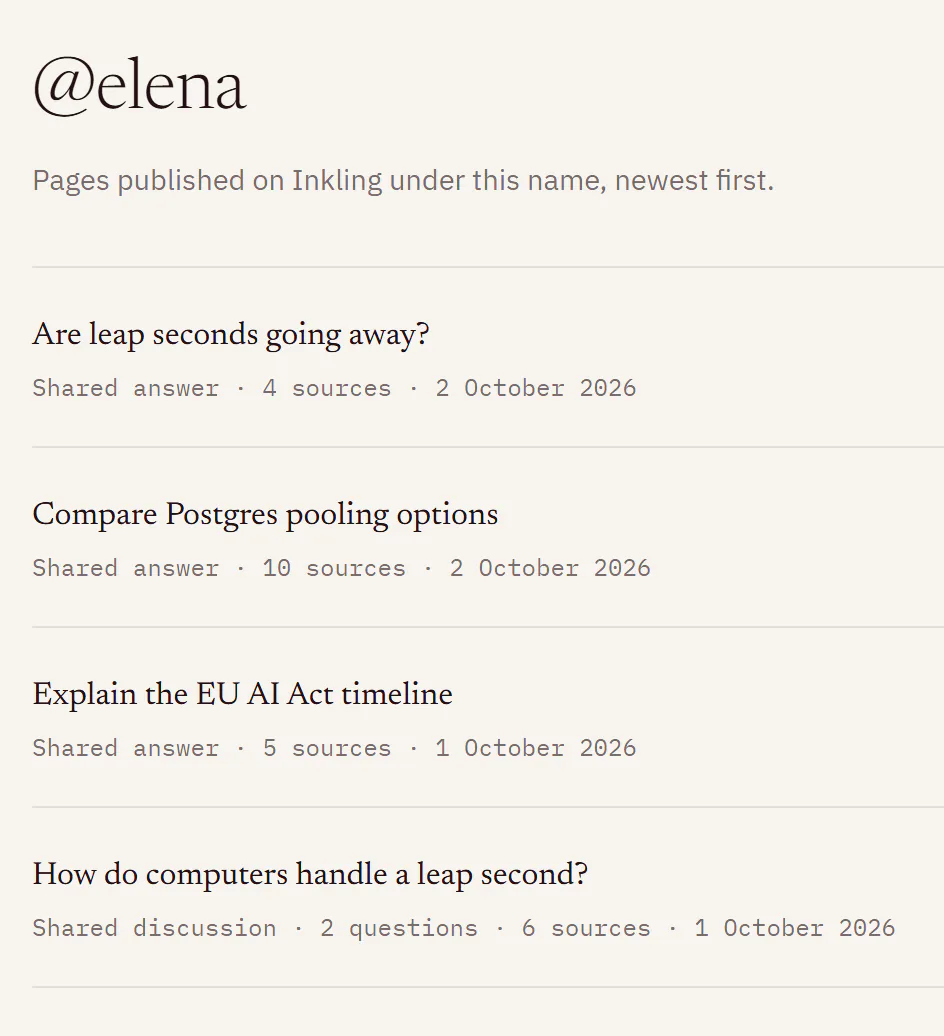
The profile lists every live page you published under the handle, including unlisted ones: Let search engines find it only decides what search engines see. Search engines are shown only the listed pages, and a profile with none is kept out of search.
Change or clear your handle
- Change: press Change in the same box, type the new handle and press Save. You can change it once every 30 days. Until then the line under the field reads “You can change it again on [date].” and Save stays greyed. Your pages follow the new name.
- Clear: press Change, then Clear. Inkling asks first, “Clear @elena?”, and explains that your pages stop showing the handle, your profile no longer lists them, and the name is held for 90 days. Press Clear handle. The pages stay published, and their footers go back to “Shared by an Inkling user.”
A handle you give up, by changing or clearing it, is held for 90 days, and nobody can take it in that time, you included. Clearing doesn’t restart the 30 days: they run from the last time you set a handle, and until they are over the box reads “You can choose a handle again on [date].” If you choose a new handle later, it lists only the pages you publish under it from then on.
Limits
| What | Limit |
|---|---|
| Length | 3 to 30 characters |
| Characters | a to z, 0 to 9 and _, starting with a letter |
| Changes | 1 every 30 days |
| A handle you give up | held from everyone for 90 days |
Good to know
- If your account leaves Pro, you keep the handle. Settings › Shared pages still shows it, says “Changing it needs Pro.”, and offers Clear, which works on any plan. Pages you already published under the handle keep saying “Shared by @elena.” and stay on your profile. Changing the handle, or putting another page under it, needs Pro.
- Pages published before you had a handle stay as they were. To add one to your profile, open Share on it, turn on Publish under and press Publish again.