API access: keys for your own apps
Checked against Inkling on , 3 min read
Open in InklingOn this page7 headings
API access is part of Pro, which a person switches on after you ask, at no charge. On Free, Integrations in Settings shows “API access is Pro.” in place of Make a key, with Request Pro access →. Request Pro access
An API key lets a script or app of your own read your notes, todos and discussions, and ask Inkling questions, as you.
Before you start
- You need the Pro plan. Keys have an allowance of their own, separate from the app’s.
- Make one key for each script or app, so you can stop one without the others.
Make a key
- Open the menu with your name in the header, choose Settings, then Integrations, or go straight to Integrations.
- Under Make a key, fill in What will use this key?. Elena calls hers “Morning digest”, after the script that reads her todos.
- Under What it may do, tick at least one box (see the table below).
- Choose Expires: never, in 30 days, in 90 days, in 6 months or in a year.
- Press Make key.
| Box | What the key may do |
|---|---|
notes:read | read notes and their sources |
todos:read | open and done, with due dates |
ask | a sourced answer, counts as an Ask call |
discussions:read | threads and their answers |
Copy it once
The key appears in full under “New key for ‘Morning digest’ — copy it now, it is shown once”. Press Copy, put it in your script, then press Done. Inkling keeps only its last four characters, so a lost key can’t be shown again: revoke it and make another.
What you’ll see
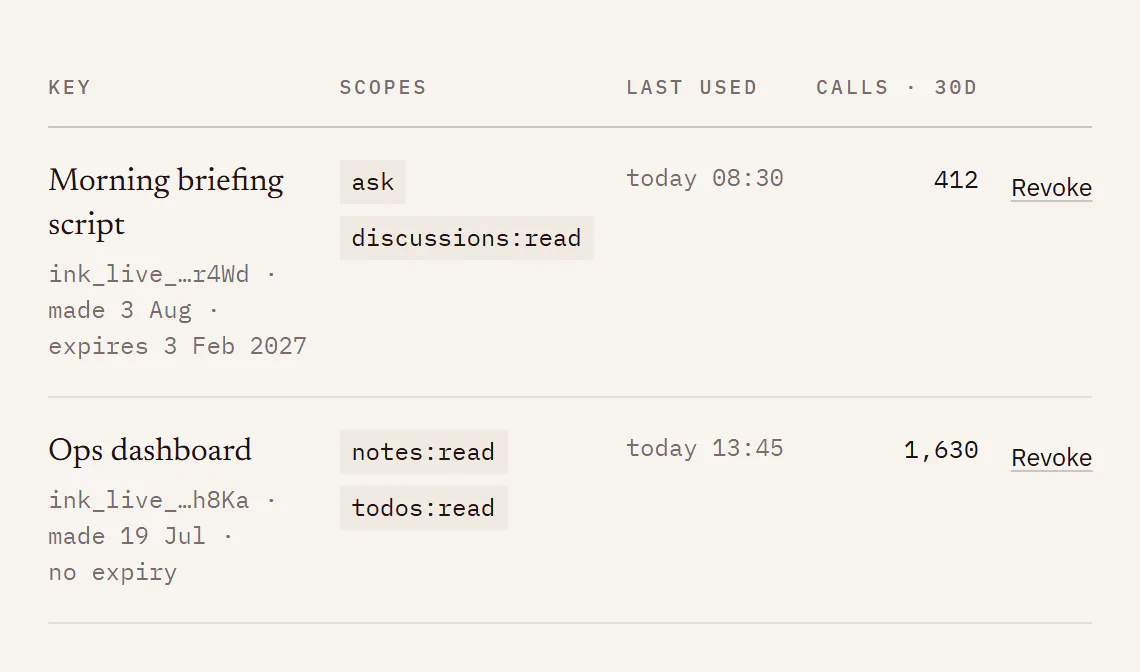
- Your keys. Each row shows the name, the last four characters, when it was made and when it expires (for example “made today 09:14 · no expiry”), what it may do, Last used, its calls over the last 30 days, and Revoke.
- This month’s meters, headed for example “This month · resets 1 December”: Calls and Ask calls, each as used against the limit.
- A suspended key says “Suspended by Inkling’s staff. It does not work until they restore it.”
Revoke a key
Press Revoke beside the key, then Revoke key. The dialog warns: “Anything using it stops within a minute. This cannot be undone: make a new key if you need one again.”
Limits
| What | Limit |
|---|---|
| Calls | currently 10,000 a month on Pro; none on Free |
| Ask calls | currently 500 a month on Pro; each also counts as a call |
| Calls a minute | currently 60, across all your keys |
| Keys | currently 10 that have not expired |
| Key name | currently up to 60 characters |
Monthly allowances reset at 00:00 UTC on the 1st. Past a limit, calls return 429; a used-up meter says, for example, “All used. Calls return 429 until 1 December.”
Good to know
- A key acts as you: “it reads what you can read, and what it asks is answered as your own question.”
- An Ask through a key is answered at Pro depth and counts against your API allowance, not the app’s. See Allowances and resets.
- A password reset revokes every key. See Reset a forgotten password.
- If Pro ends, your keys stop working but are kept: they work again with Pro, and you can still revoke them.
- Two emails. If Inkling’s staff suspend a key, “An API key on your Inkling account was suspended” names it and says why. When it is lifted, “An API key on your Inkling account works again” follows. See Emails from Inkling.