Share a note with people
Checked against Inkling on , 3 min read
Open in InklingInvite people by email to edit or read one of your notes, and only the people listed on it can open it.
Before you start
- Sharing is free on every plan.
- Only a note’s owner can invite people, change what they can do or remove them.
- The Inbox can’t be shared: “The Inbox cannot be shared. Move what you want to share into a note of its own.”
Invite someone
- Open the note and select Share at the top. The sheet Share this note opens. Before your first invitation it says “They will see your name and address.”
- Type one email address in the field.
- Choose Can edit (selected to start) or Can view beside it.
- If you like, select Add a message: “Plain text, up to 500 characters. A link or an email address cannot go in it.”
- Select Invite.
The sheet never says whether an address already has an account: “Inkling will email an invitation to this address. They open the note by signing in with it, or by creating an account with it.”
What they get
| Can edit | Can view | |
|---|---|---|
| The note | They write in it with you. “A change reaches everyone on it within a few seconds.” | They read it and see it change. They can’t type or tick. |
| Sources | Citations stay clickable; the answer a passage came from stays yours | The same |
| Checkboxes | Open todos appear on their Todos page too | None appears on their Todos page |
| Inkling | On their own allowance, not yours | Ask about the note and what changed today, on their own allowance |
Accept an invitation
When Elena invites Teuta Berisha, Teuta gets an email headed “Elena shared a note with you”, with Elena’s message, the last day the invitation is open and Open the note.
- Teuta opens it from the email, or from the top of her notes list, where the invitation waits with Decline, Report and Open. Once she joins, the note is under Shared with me in the Notes rail.
- With no account, the link offers Create account and open the note.
- Report offers Stop invitations from this person and Never email me invitations to notes or boards.
Manage the people on a note
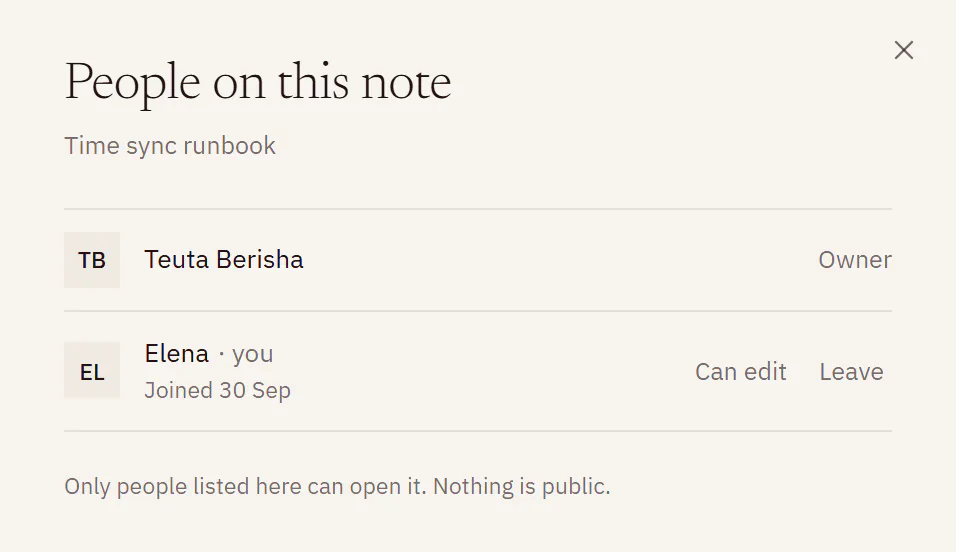
- Once shared, the button reads, for example, Shared · 2. Members open the same sheet as People on this note.
- Change a role from the menu on a row, or select Remove: “Remove Teuta Berisha from this note? The note leaves their list at once.”
- An open invitation has Resend. One that ran out reads No longer open, with Invite again.
- To leave a note, select Leave on your row, or ··· › Leave…: “It goes from your list and your Todos page.”
- Shared by me in the rail lists the notes you have shared. Deleting a note removes it for everyone.
What you’ll see
- Under the list: “Only people listed here can open it. Nothing is public.”
- If Inkling pauses sharing, members see “Working with other people on notes is paused by Inkling right now. You can still read this note.”
Limits
The same on every plan:
| Item | Limit |
|---|---|
| People on a note | Currently 10, counting you and open invitations |
| New invitations | Currently 20 a day, across your notes and boards |
| A message | Currently 500 characters |
| An invitation stays open | Currently 30 days |
| Resend | Currently once a day, 3 times in all |
Good to know
- Who sees what: “The note’s owner sees your address; everyone on it sees your name.”
- Your pins, projects, archive, templates and reminders stay yours: “Reminders are yours alone: they come to you by email, and nobody else on the note sees them.”
- To edit together, see Work on a shared note together.